Tracking numbers can now be added by users to online order and store order lines. The tracking numbers can be edited or viewed by clicking the icon next to the Delivery Details label at the left side of the order page.
Refer to the screenshots below:
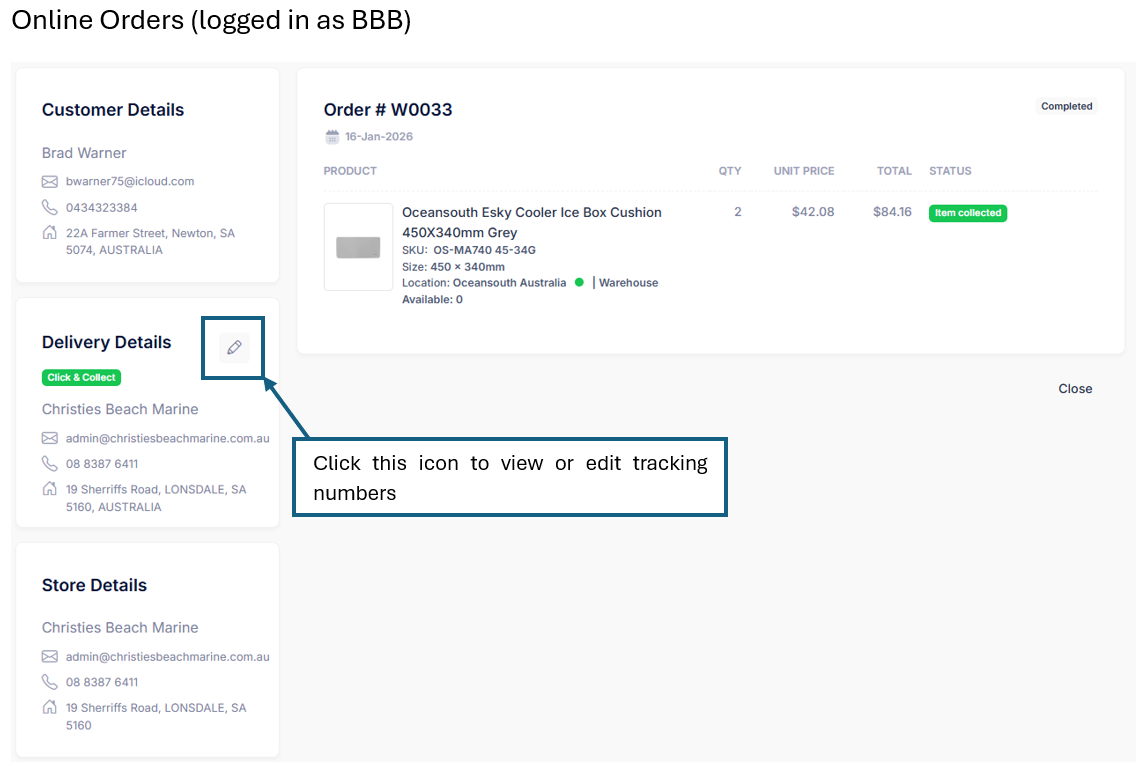
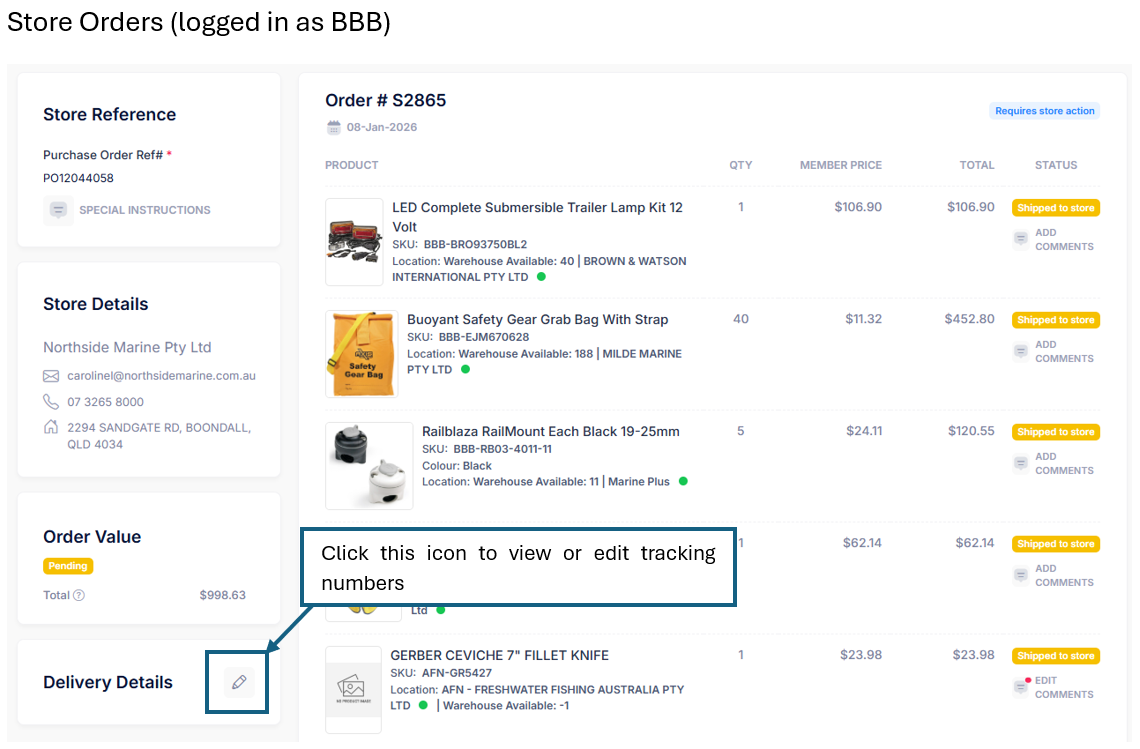
After clicking the icon you should see a delivery details modal as shown below:
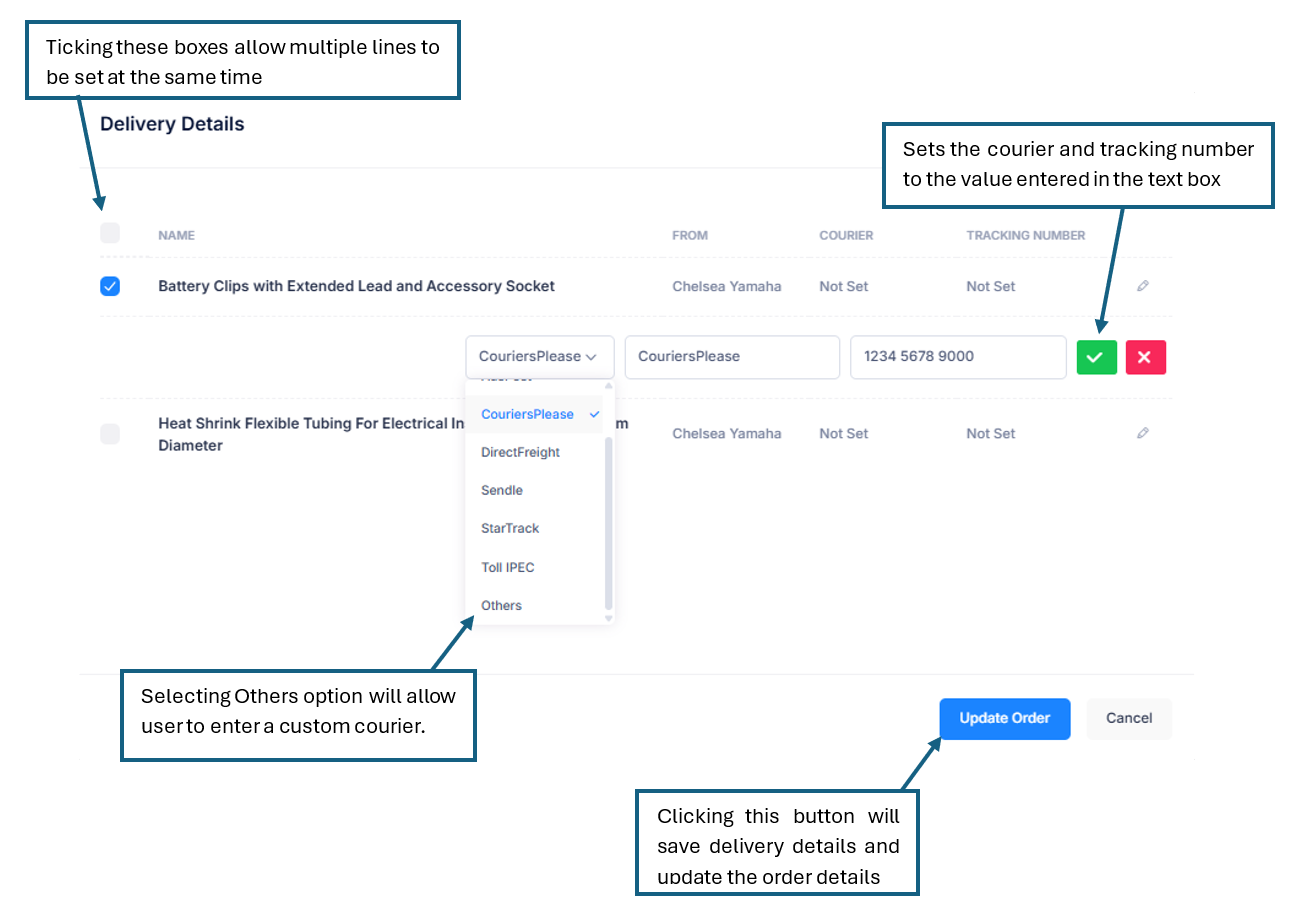
The Delivery Details modal holds a table that contains the following:
- Name – Product name of an order line.
- From– Name of shipping supplier.
- BBB Warehouse if an order is fulfilled by BBB,
- name of store (e.g., Chelsea Yamaha) if an order is fulfilled by Store; or
- name of supplier (e.g., MILDE MARINE PTY LTD) if an order is fulfilled by the supplier.
- Courier – Name of Courier from the dropdown menu or custom value when “Others” option is selected
- Tracking Number – Alphanumeric value set by BBB or Store to track the order.
Order lines become visible in the Delivery Details modal under specific conditions. When no order line is visible, the table will display a message saying, “No records to display.”
On both Online Orders and Store Orders, when the order line status is “Item Closed”, it is not displayed in the Delivery Details.
Online Orders
Both BBB and Store can edit the Courier and Tracking number information inside the Delivery Details pop-up for Online Orders
Refer to the table below
Order Line Status | Has Delivery Details | Can Store Edit* |
Click and Collect | ||
(Store Action) Ready for pick-up | ✘ | — |
(Store Action) BBB to Fulfill | ✘ | — |
(BBB Action) Use BBB Stock | ✔ | ✘ |
(BBB Action) Ship To Store | ✔ | ✘ |
(BBB Action) Item Closed | ✘ | — |
(Store Action) Received from BBB | ✔ | ✘ |
(Store Action) Received from Supplier | ✔ | ✘ |
Delivery | ||
(Store Action) BBB to Fulfill | ✘ | — |
(Store Action) Ship to Customer | ✔ | ✔ |
(BBB Action) Item Closed | ✘ | — |
(BBB Action) Ship to Customer | ✔ | ✔ |
(BBB Action) Order From Supplier | ✔ | ✔ |
*BBB can edit all tracking number values for online orders
Store Orders
Only BBB can edit the Courier and Tracking number information inside the delivery details modal for Store Orders.
Stores can only view the Courier and Tracking number information of order lines for Store Orders.
Refer to the table below
Order Line Status | Has Delivery Details |
(BBB Action) Use BBB Stock | ✔ |
(BBB Action) Order From Supplier | ✔ |
(BBB Action) Item Closed | ✘ |
*BBB can edit all tracking number values for store orders
Was this article helpful?
That’s Great!
Thank you for your feedback
Sorry! We couldn't be helpful
Thank you for your feedback
Feedback sent
We appreciate your effort and will try to fix the article